Schema.org mistakes that Google’s validator won’t catch
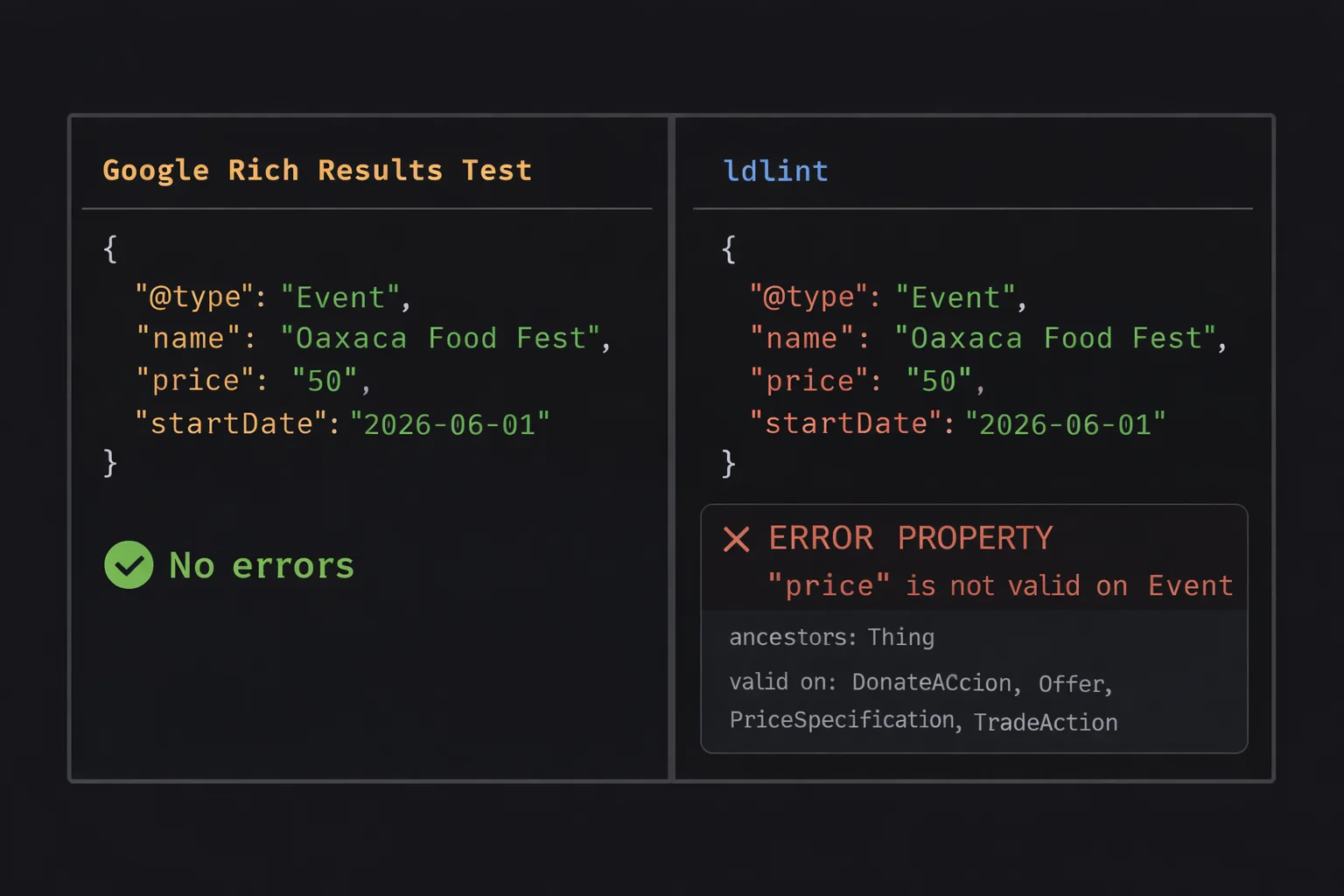
I was building structured data for a tour website. I asked an LLM to help generate the JSON-LD. One of the tours had a guide, so it added a guide property to the TouristTrip schema. Looked right. The JSON was valid. Google’s Rich Results Test didn’t complain. The LLM was confident.
But guide isn’t valid on TouristTrip. It’s valid on CreativeWork and Event. The property exists in schema.org. It just doesn’t belong on that type.
No tool told me. Not Google. Not the LLM that wrote it. Five years ago this wouldn’t matter much. Today, that same mistake gets ingested by AI systems and repeated as fact. So I built ldlint to catch these.
The gap
Google’s Rich Results Test (now folded into Search Console) only validates structured data for the specific rich result types Google supports. Recipe cards, FAQ dropdowns, product stars, that kind of thing. If your schema type isn’t one Google uses for search features, it mostly ignores it.
TouristTrip? Not a rich result type. Person as a standalone entity? Not checked.
Schema.org’s own validator is web-only. You paste markup or a URL, one page at a time. No CLI, no batch processing, no way to validate a build directory before deploy.
Google validates eligibility for features. It doesn’t validate correctness of your data. Most people assume “if Google accepts it, it’s correct.” But Google only checks what it cares about. Those are very different things.
So these bugs ship silently.
What kinds of bugs?
Two categories, both common, both invisible to existing tools.
Right property, wrong type. The property exists in schema.org but is used on a type where it doesn’t belong. price on Event (belongs on Offer), author on Product (belongs on CreativeWork), industry on Organization (belongs on JobPosting). The JSON is valid. The property name is real. It just doesn’t belong there.
Right idea, wrong name. phone instead of telephone. servings instead of recipeYield. language instead of inLanguage. Let’s be honest, nobody wants to write schema markup by hand, so the LLM does it. But LLMs reach for the natural English word, same as you would. This category is LLM bait.
Why this matters more now
Most people think of structured data as an SEO thing. Rich snippets, star ratings, FAQ dropdowns. But structured data has quietly become the machine-readable layer of the web. Search engines beyond Google use it. Aggregators rely on it. Knowledge graphs consume it. AI agents ingest it.
Bad schema used to mean a missed SEO opportunity. Now it means corrupted machine-readable truth about your business, your products, your content, being consumed and repeated by systems you don’t control.
ldlint
So I built ldlint. A CLI that validates JSON-LD against the full schema.org vocabulary. It downloads the schema.org vocabulary, builds the type hierarchy from rdfs:subClassOf, maps properties to types via domainIncludes, and validates every property against the type and all its ancestors. Caches locally, runs offline after first fetch.
Pipe in some JSON-LD and it tells you what’s wrong:
echo '{"@type":"Event","name":"Oaxaca Food Fest","price":"50","startDate":"2026-06-01"}' | ldlint -<stdin>
Event
ERROR PROPERTY "price" is not valid on Event
ancestors: Thing
valid on: DonateAction, Offer, PriceSpecification, TradeAction
1 file, 1 schema, 1 error (0.00s)Point it at an HTML file and it extracts the JSON-LD blocks automatically. With --verbose it lists every property it checked:
ldlint --verbose index.htmlindex.html
Person OK (9 properties)
alumniOf
description
image
jobTitle
knowsAbout
name
sameAs
url
worksFor
Organization OK (6 properties)
description
founder
logo
name
sameAs
url
WebSite OK (5 properties)
author
description
name
publisher
url
1 file, 3 schemas, 0 errors (0.01s)Or point it at a whole build directory:
ldlint ./dist/**/*.htmldist/about/index.html
Person OK (9 properties)
BreadcrumbList OK (1 property)
dist/contact/index.html
BreadcrumbList OK (1 property)
ContactPage OK (3 properties)
dist/projects/index.html
BreadcrumbList OK (1 property)
SoftwareSourceCode OK (6 properties)
SoftwareSourceCode OK (6 properties)
9 files, 13 schemas, 0 errors (0.01s)Exits with code 1 on errors, 0 on clean.
If you’re building with Astro, Next, Hugo, or similar, your structured data is probably generated from templates and data files. A layout component builds the JSON-LD from frontmatter or a CMS, and that same template runs across every page on the site. One wrong property in a template means every page ships with the same bug. Or worse, some conditional logic only hits certain pages so the bug only shows up on your recipe pages but not your homepage. You can’t manually paste 50 URLs into a web validator after every deploy. Point ldlint at your build output and know immediately if something broke:
- name: Build
  run: npm run build

- name: Validate structured data
  run: ldlint dist/**/*.html
Run it once in CI and you eliminate an entire class of silent data bugs.
Not sure what properties are valid on a type? The explain command shows the full hierarchy:
ldlint --explain EventEvent
ancestors: Thing
56 valid properties:
about
actor
aggregateRating
attendee
...Install
Prebuilt binaries on the releases page, or:
go install github.com/kevhq/ldlint/cmd/ldlint@latestWritten in Go, single binary, no dependencies. The source is about 850 lines.
Schema.org is everywhere. The vocabulary is well-defined. The tooling hasn’t kept up.